Auth, Teams, and RBAC in a Next.js SaaS App
How to design authentication, organizations, roles, permissions, and protected routes for a serious Next.js SaaS product.
Authentication gets users into the app. Authorization decides what they can do once they are there. In SaaS products, the second part is where many starters are too thin.
This guide covers the practical model: platform roles, organization roles, protected routes, admin access, and future enterprise needs.
Start with the User Record
Keep the user record to identity only — id, name, email, verification state, avatar, platform role, 2FA state, timestamps. Nothing organization-specific belongs here, because the same person can be an owner in one workspace and a viewer in another. The moment you store a permission field directly on the user, you've hard-coded an assumption that breaks the first time someone joins a second organization.
Add Platform Roles
Platform roles are global. Most apps only need:
user.admin.
The admin role controls platform screens such as /admin/users, /admin/subscriptions, and /admin/feature-flags.
Do not use platform admin for customer workspace permissions.
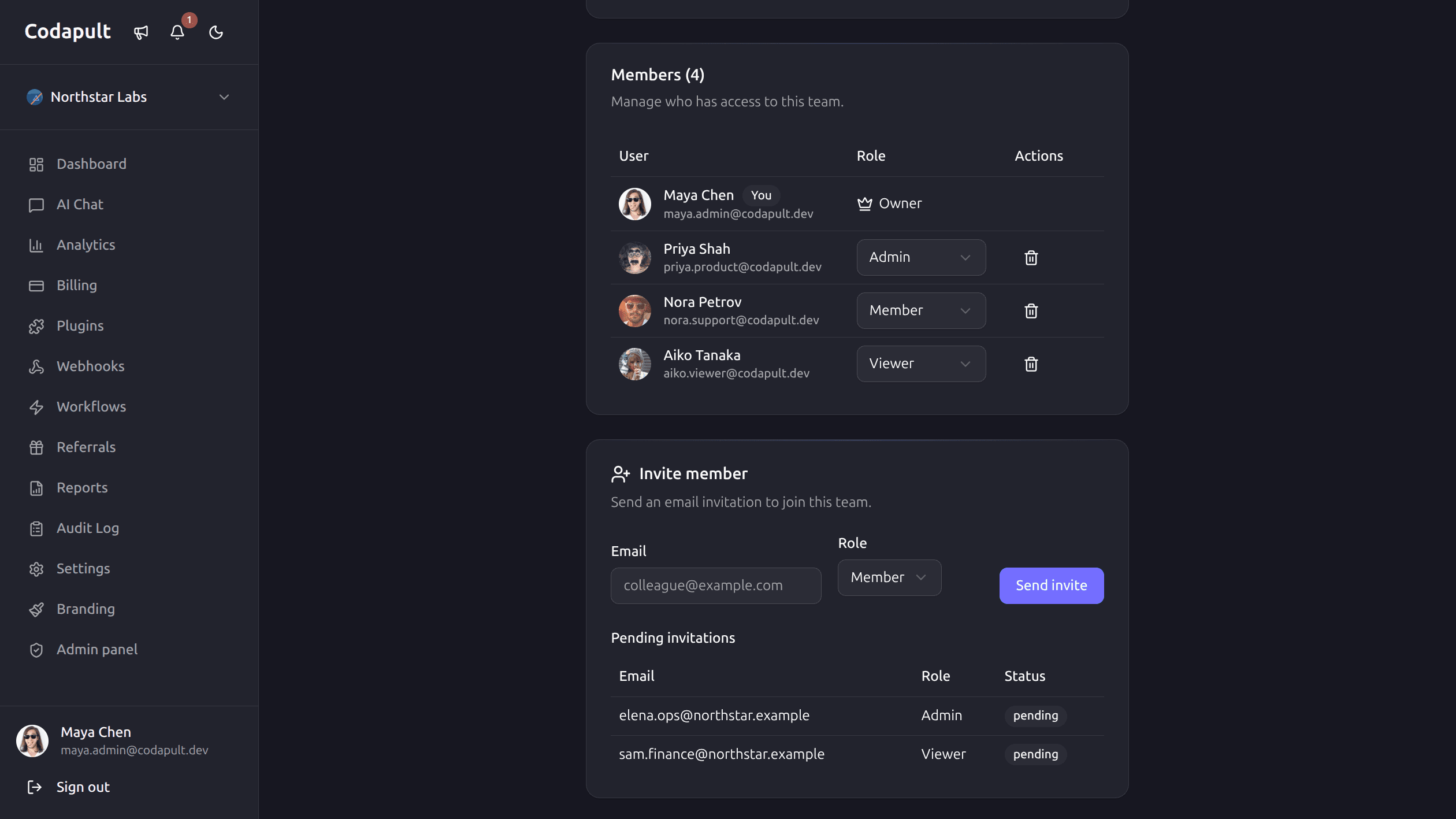
Add Organization Memberships
Organization roles should answer what a user can do inside one workspace:
owner: billing, members, settings, deletion.admin: most management actions except ownership transfer.member: normal product usage.viewer: read-only access.
This gives you enough granularity without creating a complex permission system too early.
Protect Routes at Multiple Layers
Route protection should happen in more than one place:
- Middleware or proxy redirects unauthenticated users.
- Layouts block protected app areas.
- Server actions verify the session.
- API routes verify the session.
- Admin operations verify platform role.
- Organization operations verify membership and org role.
The UI can hide buttons, but the server must enforce permissions.
Keep Auth Pages Out of Search
Sign-in, sign-up, dashboard, and admin pages should not be indexed. They are not acquisition pages, and search engines do not need them.
Use:
robotsmetadata withindex: false.robots.txtdisallow rules for protected paths.- Sitemap exclusion for auth-only pages.
This keeps SEO focus on marketing, docs, blog, pricing, and comparison pages.
Plan for Enterprise Auth Without Building It Too Early
Enterprise customers often ask for:
- SAML SSO.
- SCIM provisioning.
- Enforced 2FA.
- Audit logs.
- Domain verification.
- Custom session policies.
You do not need to ship every enterprise feature on day one. You do need a data model that can add them without rewriting auth and teams.
Support Impersonation Carefully
Impersonation is powerful for support, but it is sensitive.
Rules:
- Only platform admins can impersonate.
- Show a visible impersonation banner.
- Log the impersonation start and end.
- Never let impersonation bypass destructive confirmation steps silently.
- Avoid using impersonation for billing provider actions when possible.
Test the Permission Matrix
Write tests for:
- Anonymous user access.
- Authenticated user access.
- Admin-only routes.
- Owner-only organization settings.
- Member actions.
- Viewer restrictions.
- Locale-prefixed protected routes.
Auth regressions are high-risk because they often expose data, not just break UI.
The Practical Baseline
None of this is exotic. A real auth provider, protected routes at every layer, a platform admin role, an organization membership table with roles, server-side permission checks, audit logging, and noindex on anything that isn't marketing. That's the baseline that survives contact with a real customer — not an enterprise IAM project, just enough structure that adding SSO later doesn't mean rewriting how permissions work.
Codapult includes this full auth and teams layer out of the box — email/password, OAuth, magic links, TOTP 2FA, SAML SSO, organizations, RBAC, invitations, protected routes and audit logs — switchable between Better-Auth and Kinde via one environment variable. Explore the implementation map in the authentication docs.