Why Your Next.js 16 SaaS Dashboard Still Feels Slow
Learn how to use Next.js 16 Cache Components, Partial Prefetching, and streaming in a multi-tenant SaaS dashboard. Covers cache keys, invalidation, remote handlers, and self-hosted deployments.
A practical guide to Cache Components, Partial Prefetching, streaming, and the production trade-offs behind a multi-tenant dashboard.

A dashboard can feel slow even when no individual request looks alarming. You click Projects; the page frame appears, then the table arrives. You open Analytics and wait again, even though most of the dashboard is familiar. In the traces, every query looks reasonable. In the product, each click still feels heavier than it should.
I wouldn't reach for Redis first. Before adding another layer, I'd find out what the user is actually waiting for — and whether the server is doing work that doesn't need to happen. Is the next route being prepared before the click? Is a request-specific value holding up the first useful part of the page? Are independent sections blocking one another? Or is a proxy buffering a response that Next.js has already started streaming?
Those symptoms can look similar in the browser, but they need different fixes.
I'll use a small B2B dashboard as a running example: users belong to workspaces, workspaces contain projects, and the dashboard also shows usage and activity. We'll decide what to cache, invalidate it after a mutation, prepare likely routes, and then look at the problems that tend to appear only after deployment.
1. Configure the rendering model deliberately
For the setup in this article, enable both options explicitly. Cache Components is required for use cache; Partial Prefetching is a separate opt-in that changes what Next.js prepares before navigation. If you're upgrading an existing application, review links that currently rely on full prefetching before switching it on:
// next.config.ts

import type { NextConfig } from 'next';

const nextConfig: NextConfig = {
  cacheComponents: true,
  partialPrefetching: true,
};

export default nextConfig;
These options solve related but different problems.
cacheComponents enables the use cache model. You can cache a function, component, or route and let Next.js combine reusable output with request-time work.
partialPrefetching changes what Next.js prepares before navigation. With it enabled, the framework can prefetch a reusable App Shell for a route instead of preparing a separate full payload for every link. URL-specific content — for example, content that depends on params or searchParams — can resolve after the click. A link can opt into a fuller prefetch with prefetch={true}.
In Next.js 16.4.6, Partial Prefetching is still an explicit setting. If you're upgrading an application that adopted Cache Components before Partial Prefetching was available, you can keep the old behavior with partialPrefetching: false while migrating. Don't assume that omitting the option enables it: the current docs say the unset value behaves like false and produces a warning.
The examples below assume both options are enabled. The generated TypeScript template in Next.js 16.4.6 does not make this choice for you; treat it as an application-level decision, not a default you can safely assume.
2. Cache along the data-sharing boundary
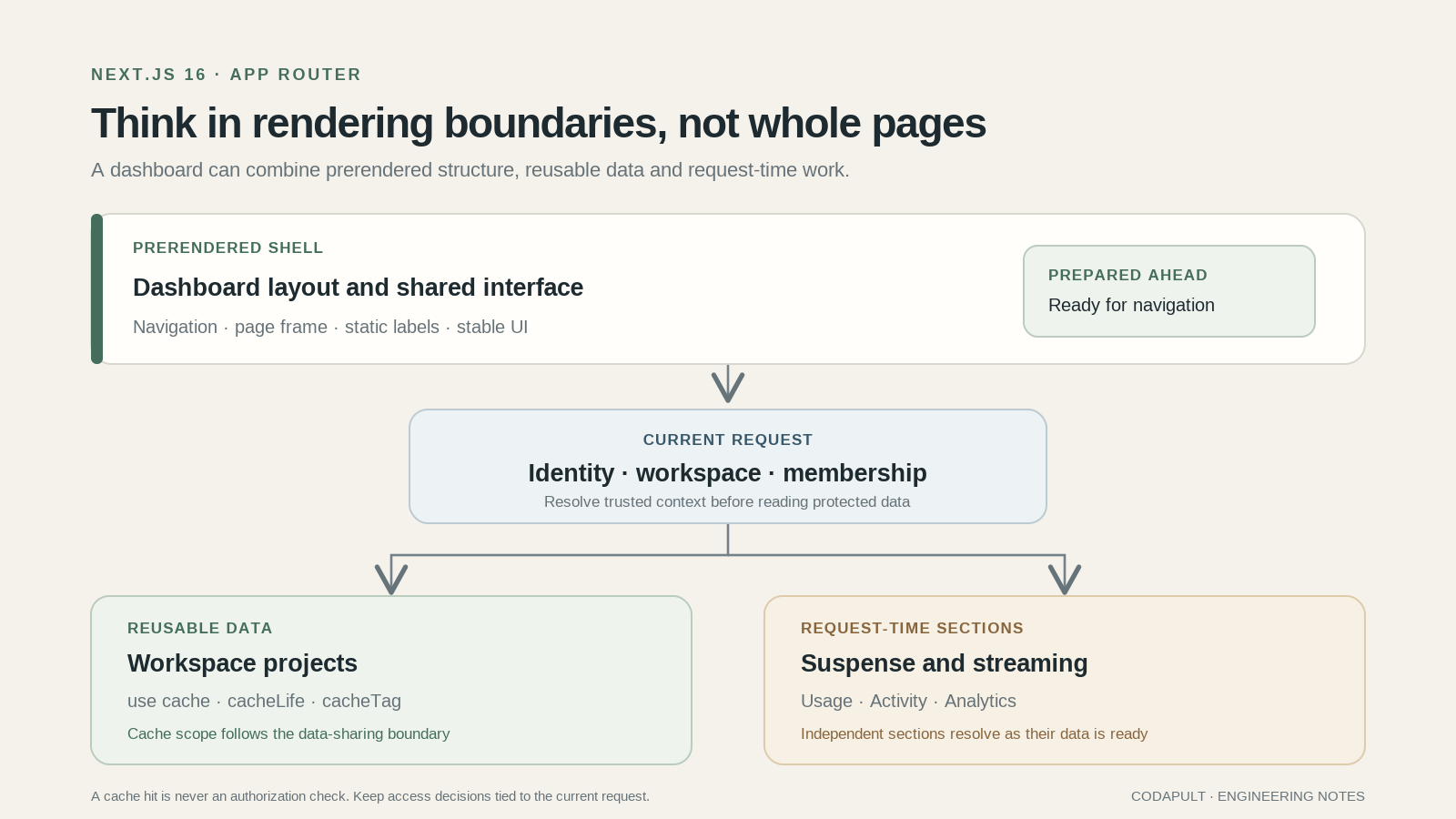
Take the project list. In this example, every active member of a workspace sees the same projects. That gives us a natural cache boundary: the workspace.
// lib/projects.ts

import { cacheLife, cacheTag } from 'next/cache';
import { db } from '@/lib/db';

export async function getWorkspaceProjects(workspaceId: string) {
  'use cache';

  cacheLife('minutes');
  cacheTag(`workspace:${workspaceId}:projects`);

  return db.project.findMany({
    where: { workspaceId },
    orderBy: { updatedAt: 'desc' },
    select: {
      id: true,
      name: true,
      updatedAt: true,
    },
  });
}
Two lines do different jobs here, and it's easy to confuse them.
workspaceId is a function argument, so it participates in the cache key. A request for workspace A doesn't reuse the result cached for workspace B. cacheTag() doesn't partition the cache; it gives us a label we can use to invalidate matching entries later.
The query is scoped by the same workspace ID as a second line of defence. Don't trust a workspace ID just because it came from the URL. If workspace selection is URL-based, resolve it and verify membership first; pass the canonical, authorized ID to the cached function. Use stable identifiers in cache arguments and tags; don't pass session cookies, bearer tokens, or other secrets just to create a separate cache entry.
Here's how I'd use the function from a page. The request-specific work sits behind a Suspense boundary, so it doesn't hold up the prerendered part of the route:
// app/dashboard/projects/page.tsx

import { Suspense } from 'react';
import { ProjectsContent } from './projects-content';
import { ProjectsSkeleton } from '@/components/projects/projects-skeleton';

export default function ProjectsPage() {
  return (
    <main>
      <h1>Projects</h1>
      <Suspense fallback={<ProjectsSkeleton />}>
        <ProjectsContent />
      </Suspense>
    </main>
  );
}
The child resolves the current identity and checks membership before reading the cached list. The marker around the result will also give the browser test later a meaningful point to wait for:
// app/dashboard/projects/projects-content.tsx

import { notFound } from 'next/navigation';
import { db } from '@/lib/db';
import { requireSession } from '@/lib/auth';
import { getWorkspaceProjects } from '@/lib/projects';
import { ProjectList } from '@/components/projects/project-list';

export async function ProjectsContent() {
  const session = await requireSession();

  const membership = await db.workspaceMember.findFirst({
    where: {
      workspaceId: session.workspaceId,
      userId: session.userId,
      status: 'ACTIVE',
    },
    select: { id: true },
  });

  if (!membership) notFound();

  const projects = await getWorkspaceProjects(session.workspaceId);

  return (
    <section data-testid="projects-ready">
      <ProjectList projects={projects} />
    </section>
  );
}
requireSession() and the database queries are application code, not Next.js APIs. The important bit is where they run: outside the cached function. cookies() and headers() are request-time APIs; read them in the request-specific part of the tree, then pass only the trusted values the cache needs.
There is an assumption behind this example: membership is enough to see every project in the workspace. If your product has project-level permissions, the workspace ID alone is not a sufficient cache boundary. Either include the relevant access scope in the cached function and its query, or don't cache that user-specific result.
A cache hit is never proof that the current user is allowed to see the result. Keep authorization checks at the server boundary even when the data itself is cached. The cache boundary should follow the data people are allowed to share, not replace the checks that establish who is allowed to see it.
3. cacheLife is not a one-number TTL
The minutes profile is a good example of why cache lifetimes need a little explanation:
cacheLife('minutes');It has three values:
| Setting | Value | What it controls |
|---|---|---|
stale | 5 minutes | How long the client router can reuse the result without checking the server |
revalidate | 1 minute | When a server request can serve the old result and refresh it in the background |
expire | 1 hour | When the next request must wait for fresh data instead of using the expired entry |
The clock doesn't run a background job that refreshes every cache entry at the exact one-minute mark. revalidate is checked when a request arrives. If the entry is old enough, Next.js can return the stale value and regenerate it in the background. Once expire is passed, a request has to wait for the new result.
The stale value is for the client-side router. It is not an HTTP Cache-Control header and shouldn't be used as a substitute for CDN policy.
For a project list, the minutes profile may be acceptable. For a public plan catalogue, hours could be enough. For a rapidly changing activity feed, I'd either choose a shorter profile or avoid caching the data at all. A cache profile is a product decision: how old can this particular piece of information be before someone notices or makes the wrong decision?
You can define a one-off lifetime too:
cacheLife({
  stale: 60,
  revalidate: 30,
  expire: 300,
});
Those values are examples, not a recommendation to use the same policy everywhere. The client router enforces a 30-second minimum stale time, even if a shorter value is configured. There are also separate prerendering thresholds in Next.js 16.4.6: a stale value below 30 seconds excludes the cached content from prerendering; a value from 30 seconds up to (but not including) 5 minutes allows it in prerendered output but excludes it from the route's App Shell; 5 minutes or more makes it eligible for the App Shell, assuming the rest of the route can be prerendered. The stale: 60 example above falls into the middle range: it can be prerendered, but you should not expect that cached content to be part of the reusable App Shell. A separate rule also excludes content when revalidate is 0 or expire is under 5 minutes.
4. Choose invalidation based on what the user expects
The user renames a project. The database write succeeds, but the cached project list still contains the previous name. Which API should handle that?
For a mutation initiated by the user, I'd use updateTag() in the Server Action:
// app/actions/projects.ts

'use server';

import { updateTag } from 'next/cache';
import { db } from '@/lib/db';
import { requireSession } from '@/lib/auth';
import { assertCanEditProjects } from '@/lib/permissions';

export async function renameProject(projectId: string, name: string) {
  const session = await requireSession();
  const normalizedName = name.trim();

  if (!normalizedName || normalizedName.length > 120) {
    throw new Error('Invalid project name');
  }

  await db.$transaction(async (tx) => {
    // This helper must use the same transaction client for its permission query.
    await assertCanEditProjects(tx, session.userId, session.workspaceId);

    const result = await tx.project.updateMany({
      where: {
        id: projectId,
        workspaceId: session.workspaceId,
      },
      data: { name: normalizedName },
    });

    if (result.count !== 1) {
      throw new Error('Project not found');
    }
  });

  updateTag(`workspace:${session.workspaceId}:projects`);
}
The permission helper is application-specific; in this example it receives the transaction client so its membership and permission queries run in the same transaction as the update. Adapt the transaction isolation level and conditional update to your database schema. The important thing is not to leave a gap between checking access and changing the record.
updateTag() expires the tagged data immediately. The next read waits for fresh data, which is what a user expects after renaming something. It can only be called from a Server Action.
A webhook updating a public catalogue is a different case. Visitors usually don't need to block while the new catalogue is generated. After verifying the webhook signature and processing the event idempotently, a Route Handler can mark the data stale:
import { revalidateTag } from 'next/cache';
import { verifyAndProcessPlanWebhook } from '@/lib/webhooks/plans';

export async function POST(request: Request) {
  await verifyAndProcessPlanWebhook(request);
  revalidateTag('public:plans', 'max');

  return Response.json({ revalidated: true });
}
With the max profile, the next request can receive stale content while Next.js refreshes it in the background. The call doesn't eagerly regenerate the data at webhook time.
A useful rule of thumb:
updateTag()when the user should immediately see their own write.revalidateTag(tag, 'max')when stale-while-revalidate is acceptable.
There's one failure window worth acknowledging. The database commit and cache invalidation aren't one atomic operation. If the process dies after the write but before invalidation, the cache may remain stale until its normal expiry. If that is unacceptable, record an invalidation event in a transactional outbox alongside the data change, then have a worker deliver it through a protected revalidation endpoint. Make the delivery idempotent and choose a revalidation profile that matches the required freshness.
5. Prefetch the shell; fetch the details when they're needed
With partialPrefetching: true, Next.js prepares a reusable App Shell for a route. The shell contains the parts that don't depend on a particular URL. A hundred links to project detail pages in the same session therefore don't need a hundred copies of the same shell. This is related to caching, but it solves a different problem: prefetching decides what work happens before navigation; caching decides which results can be reused.
For most navigation, the default is what you want:
import Link from 'next/link';

export function DashboardNavigation() {
  return (
    <nav>
      <Link href="/dashboard">Overview</Link>
      <Link href="/dashboard/projects">Projects</Link>
      <Link href="/dashboard/settings">Settings</Link>
    </nav>
  );
}
The route-specific part can resolve after the click. If you know a particular destination is very likely to be opened and want more than its shell, use prefetch={true} on that link. That requests URL-specific content before navigation, but it also creates per-link work. If a link should not trigger even the App Shell prefetch, use prefetch={false}.
For a large project table, I'd leave the default behavior on each row. The links can share the route's App Shell without each triggering a separate full prefetch. I'd reserve prefetch={true} for a small number of destinations where having URL-specific data ready before the click is worth the extra request:
import Link from 'next/link';

// Repeated in a project table: prefetch the shared App Shell by default.
export function ProjectRowLink({ projectId }: { projectId: string }) {
  return <Link href={`/dashboard/projects/${projectId}`}>Open this project</Link>;
}

// Used for a single featured destination: prepare its URL-specific content too.
export function FeaturedProjectLink({ projectId }: { projectId: string }) {
  return (
    <Link href={`/dashboard/projects/${projectId}`} prefetch={true}>
      Open featured project
    </Link>
  );
}
Use prefetch={false} selectively for links where even fetching the shared shell is not worth the cost. Avoid adding prefetch={true} to a repeated row component: every visible link can trigger its own URL-specific prefetch, even when all those links point to the same dynamic route pattern.
There is one SaaS-specific detail worth keeping in mind: the App Shell is not necessarily identical for every visitor. If the part of the route rendered into the shell reads cookies() or headers(), Next.js includes the resulting session-specific UI and caches that shell per session on the client. In the example above, the identity and membership checks are inside ProjectsContent, below the page's Suspense boundary, so the heading and fallback can remain the reusable shell. If a shared layout reads session data before a boundary, account for the fact that its shell is session-specific.
One more consequence: don't put side effects in Server Component rendering. A route may be rendered while Next.js prepares it, not only when a person has consciously opened it. With Partial Prefetching, request-specific content is normally deferred until navigation, but prerendering, revalidation, and an explicit full prefetch can still execute server rendering ahead of the moment a user sees the page. Writing an audit record, sending a notification, or charging an account from a component render is a bug waiting to happen. Keep those operations in an explicit action or handler. For analytics, use a client-side navigation signal or a dedicated analytics integration that distinguishes a real visit from a prefetch.
6. Streaming only helps if the slow part is below the boundary
A project dashboard often has a few pieces that don't depend on one another. The heading and navigation can be ready immediately. The usage chart may take a little longer. A detailed activity report might require several database queries.
Give those sections separate boundaries instead of making one slow request hold up the whole page:
// app/dashboard/analytics/page.tsx

import { Suspense } from 'react';
import {
  AnalyticsHeader,
  ChartSkeleton,
  ReportSkeleton,
  UsageChart,
  DetailedReport,
} from '@/components/analytics';

export default function AnalyticsPage() {
  return (
    <main>
      <AnalyticsHeader />

      <Suspense fallback={<ChartSkeleton />}>
        <UsageChart />
      </Suspense>

      <Suspense fallback={<ReportSkeleton />}>
        <DetailedReport />
      </Suspense>
    </main>
  );
}
The boundaries should follow meaningful chunks of the interface. A chart and a report are good candidates. A wrapper around every small text label isn't.
For a route-level fallback, use loading.tsx. It gives the segment a loading boundary and can help with navigation prefetching. It does not wrap the segment's layout, though. If a shared layout waits for cookies(), a database call, or another request-time value before rendering its children, a Suspense boundary inside the page cannot make that layout appear earlier.
This is why I try to keep shared layouts boring: navigation, frame, and stable UI. Resolve user-specific data in the component that actually needs it.
And don't forget the network path. When self-hosting behind Nginx or another reverse proxy, buffering can erase the benefit of streaming. Next.js documents X-Accel-Buffering: no as one way to disable Nginx buffering, but the load balancer and every proxy between the browser and Node.js must also pass streaming responses through. A page can be perfectly split into Suspense boundaries and still arrive in one lump if an intermediary buffers it.
7. Remote cache is shared infrastructure, not a magic switch
A local cache can make a single instance look healthy while hiding what happens when requests are spread across several processes. That's where adding a remote cache becomes an architectural decision rather than a configuration tweak.
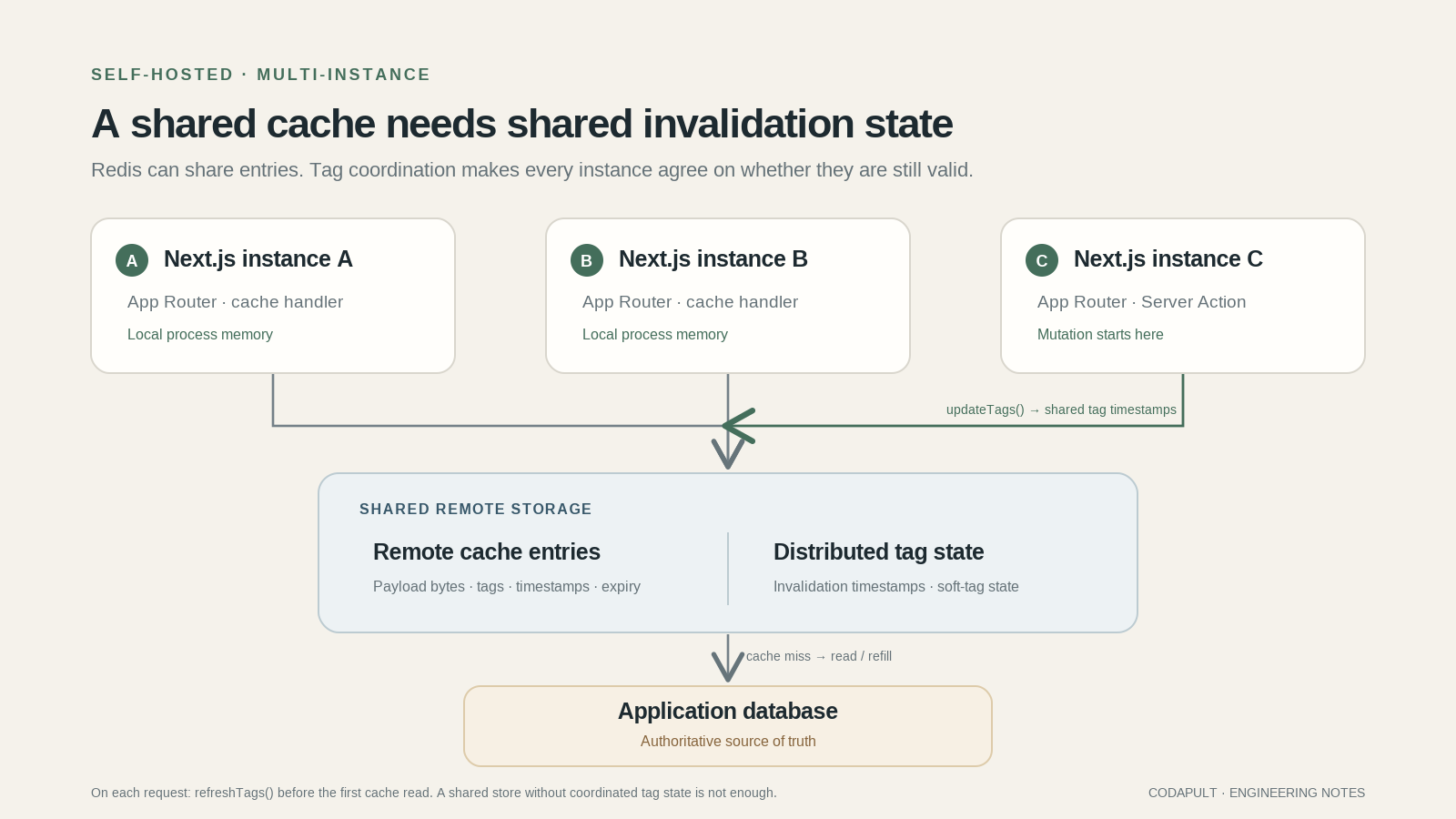
The default use cache handler is in-memory and isolated to a Next.js process. With three instances behind a load balancer, each process has its own cache. A request can populate instance A, the next request can miss on B, and a mutation handled by C won't automatically update either local cache.
Decide what belongs in the shared cache
use cache: remote is intended for cases where a shared cache is worth the network roundtrip and infrastructure cost:
// lib/plans.ts

import { cacheLife, cacheTag } from 'next/cache';
import { db } from '@/lib/db';

export async function getPublicPlans() {
  'use cache: remote';

  cacheLife('hours');
  cacheTag('public:plans');

  return db.plan.findMany({
    where: { published: true },
    orderBy: { sortOrder: 'asc' },
  });
}
On a managed platform, the provider may configure the remote handler for you. On a self-hosted deployment, you need to supply one through cacheHandlers:
// next.config.ts

import type { NextConfig } from 'next';

const nextConfig: NextConfig = {
  cacheComponents: true,
  partialPrefetching: true,
  cacheHandlers: {
    remote: require.resolve('./cache-handlers/remote-handler.js'),
  },
};

export default nextConfig;
This config maps only the remote handler; it registers the implementation but does not provide one. You still need to write remote-handler.js or adapt an existing handler. Plain 'use cache' functions continue to use the default handler. That may be exactly what you want: keep small, local, build-time or shell-oriented work in memory and send only selected operations to shared storage. If you want both kinds of cache to be shared, configure a shared default handler as well.
One naming trap is worth calling out: cacheHandlers (plural) configures the 'use cache' family. The older cacheHandler (singular) is a separate API for the Incremental Cache used by ISR and other route-level caching. Configuring a remote handler for 'use cache: remote' doesn't automatically make those other caches shared. The official Next.js Redis cache-handler example for v16.4.6 demonstrates both interfaces and how they are wired independently.
Implement the handler only when you need to
I'd resist writing a custom handler until there's a measured reason. The interface looks small, but the details are where a cache becomes correct or subtly wrong. Next.js expects five methods:
| Method | Responsibility |
|---|---|
get() | Return an entry, or a cache miss when it is absent or invalidated |
set() | Persist a completed entry and its timing metadata |
refreshTags() | Synchronize invalidation state before the first read in a request |
getExpiration() | Report the latest invalidation time for route-derived soft tags, or delegate their check to get() |
updateTags() | Record immediate expiry or stale-while-revalidate invalidation |
The stream in a CacheEntry is the first easy way to get this wrong. set() receives a Promise<CacheEntry>, so await it before reading the entry. Its value is a single-use ReadableStream<Uint8Array> tied to the request that produced it. Consume it once and persist the bytes; don't retain either the stream or the pending promise after set() resolves. Every successful get() must create a new readable stream over the stored bytes.
The built-in in-memory handler uses a process-local pendingSets map so a get() in the same process waits for an in-flight set() for that key. That's an implementation choice, not an additional requirement of the CacheHandler contract. A custom handler can add the same local coordination, but it will not prevent two different Next.js instances from regenerating the same key at once. If that cross-instance stampede is costly, add distributed single-flight coordination or a lock with a bounded lease; don't treat a process-local map as a cluster-wide solution.
Next.js compares an entry's timestamp with expire on every read and treats an expired entry as a miss. It also applies the revalidate check when a result is about to be written into another server cache. Your get() method does not need to duplicate either age check. Between those two limits, a shared handler can keep returning the stale entry while Next.js generates a replacement in the background. That is why the external store's TTL should normally follow expire, not revalidate. Eviction is still the handler's responsibility: Next.js won't delete entries from your external store, so Redis needs a TTL or the store needs a size-bounded eviction policy.
Keep invalidation consistent across instances
The two kinds of tags need different handling. Explicit tags added with cacheTag() are stored in entry.tags. Route-derived soft tags are not; Next.js passes them separately to get(cacheKey, softTags). revalidatePath() uses those soft tags, so checking only entry.tags will miss path invalidations. A handler can check softTags inside get() and return Infinity from getExpiration() to tell Next.js it has done so. Or it can keep soft-tag timestamps centrally and have getExpiration() return their latest invalidation time. Pick one approach and implement it consistently.
updateTags() has two modes. When durations is absent, the tag is expired immediately; that's the path used by updateTag() and the deprecated no-profile form of revalidateTag(). A matching entry should be returned as a miss. When durations is present, as with revalidateTag(tag, 'max'), the tag becomes stale now but the entry may be served while it refreshes, up to the supplied expiration window. A handler can signal that stale state by returning the entry with revalidate: -1; after the stale window expires, it should return a miss. This is more precise than treating every invalidation as a delete.
There is an important limitation in the official Redis example linked above: its remote-cache-handler.js implements timestamp-based immediate invalidation. Its updateTags() accepts only tags and records the current timestamp; it does not consume the optional durations argument. As written, it supports the immediate-invalidation path used by its example, but it does not implement the stale-while-revalidate behavior of revalidateTag(tag, 'max'). Treat it as a starting point, not a drop-in implementation of both modes. To support profile-based revalidation, extend the stored tag state and the get() / getExpiration() logic to honor the supplied expiration window, and test explicit tags and route-derived soft tags separately.
For a distributed handler, updateTags() writes the invalidation state to shared storage and refreshTags() synchronizes it before the first cache read in each request. If get() cannot read the backend, catch that error and return undefined so Next.js can regenerate instead of turning a cache outage into a render failure. Apply the same fail-closed principle to getExpiration(), which checks route-derived soft tags: if the backend cannot confirm their state, return a timestamp that makes the entry stale (the official Redis example uses Date.now()), or return Infinity only when get() checks those soft tags itself. Returning 0 during an outage can make an already-invalidated path look current. If set() fails, log it and leave the response uncached. Do not silently swallow a failed updateTags(): reporting a successful invalidation that never reached shared storage can let other instances keep serving old data. If that invalidation must survive process crashes, put it in a transactional outbox.
This fallback has a capacity cost. When Redis is unavailable, cache reads become misses; if many requests do that at once, the database and upstream services can receive a sudden burst of regeneration work. Fail-closed behavior protects freshness, but it does not protect origin capacity. Monitor cache errors and miss rates, and pair the fallback with query timeouts, concurrency limits, and a deliberate degraded-mode or load-shedding strategy. A bounded local fallback may help for some data, but never trade tenant isolation or invalidation correctness for availability.
Finally, treat writes as atomic. A failed stream or partially written Redis value must never become a valid cache entry. Write to a temporary key and promote it only after the stream is complete, or use an atomic operation that gives you the same guarantee.
Before adding Redis, check the numbers. The Next.js docs call out cases where remote caching is unlikely to help: local operations already below roughly 50 ms, keys that are unique on almost every request, or data that changes so frequently that most reads become misses. A remote cache should remove meaningful work, not just add another place for requests to wait.
8. A multi-instance deployment has a few more moving parts
A shared cache is only one part of running several Next.js instances. The application also needs a consistent release identity and compatible Server Action configuration across its replicas.
All instances serving the same release should run the same build. If your pipeline builds instances separately, give every build serving that release the same NEXT_SERVER_ACTIONS_ENCRYPTION_KEY; otherwise, one instance may be unable to decrypt a Server Action created by another. Generate the key once, store it as a deployment secret, and provide it at build time:
openssl rand -base64 32Next.js uses a 32-byte key by default. Do not commit the generated value or paste it into application code.
Set a deployment identifier for rolling releases:
import type { NextConfig } from 'next';

const nextConfig: NextConfig = {
  cacheComponents: true,
  partialPrefetching: true,
  deploymentId: process.env.DEPLOYMENT_VERSION,
};
deploymentId helps the client detect version skew and fall back to a full navigation when its assets or prefetched data belong to a different deployment. It also participates in the use cache key, so a new deployment doesn't accidentally reuse entries created by an older build. It is not traffic routing: Next.js doesn't route a request to the matching release based on ?dpl=. Your host or load balancer still has to keep deployments and their replicas consistent. Use the same deployment ID for every instance in one release, and a new ID for the next release.
Include the reverse proxy and load balancer in this test. A successful response from next start alone does not prove that every intermediary preserves streamed chunks for the browser.
These are the sorts of problems that won't show up when everything runs in one local next start process.
9. Measure the route the user actually takes
A cache hit is not a performance result. A remote lookup can be slower than a local database query. Prefetching can make a click feel instant while quietly increasing requests for destinations nobody opens. A skeleton can appear quickly while the data the user needs remains unavailable.
Measure what the user experiences, then look at how much server work the application performs to deliver it. Those are related measurements, but they aren't interchangeable. Automatic <Link> prefetching runs in production, not in next dev, so run this check against a production build:
pnpm build
pnpm start
The example below assumes Playwright has a baseURL configured and the browser context is already authenticated. The projects-ready marker shown in the earlier ProjectsContent example wraps the actual results, not the loading skeleton. This test therefore records the time from clicking the Projects link until the project content is available:
import { test, expect } from '@playwright/test';

test('projects navigation renders the project content', async ({ page }) => {
  await page.goto('/dashboard');

  const startedAt = await page.evaluate(() => performance.now());

  await page.getByRole('link', { name: 'Projects' }).click();

  await expect(page.getByTestId('projects-ready')).toBeVisible();

  const elapsed = await page.evaluate((start) => performance.now() - start, startedAt);

  console.log(`Projects navigation to content: ${elapsed.toFixed(1)}ms`);
});
This is an application-level metric, not a Core Web Vital. The marker should appear only when the actual table or meaningful empty state is ready; don't put it around a skeleton. Run the test repeatedly and compare median and p75 results. Keep the environment consistent. A warm client cache and a cold first visit are different scenarios, so measure both. If you want to measure an uncached navigation, make that a separate scenario and deliberately control prefetching rather than assuming the link wasn't prefetched.
I'd track at least four things:
- Navigation: time from click to useful content, split into cold and warm visits.
- Backend work: query count, query duration, and calls to external services.
- Cache behavior: hit rate, misses, regeneration time, remote lookup latency, and invalidation propagation.
- Correctness: whether a rename appears immediately, whether a revoked member loses access, and whether one workspace can ever receive another workspace's records.
LCP and INP still matter, but they answer different questions: initial loading and interaction responsiveness. They don't replace a route-transition measurement.
For a multi-instance cache, run one test that crosses processes: populate an entry through instance A, mutate the source data, invalidate its tag, then read through instance B. Verify that B sees the expected state. Repeat it under concurrent requests and during a rolling deployment. A single-process test cannot prove distributed invalidation.
I'd also test the tenant boundary with two workspaces that deliberately contain records with similar IDs and names. The goal isn't only to prove that the happy path works. Try changing a workspace ID, revoking membership, and opening a direct URL as a user who should not have access.
What I'd ship first
I wouldn't introduce a remote cache, a custom handler, and aggressive prefetching in one change. That makes it difficult to tell which part helped — and which part created a new problem.
For a typical SaaS dashboard, I'd ship this in stages:
- Move request-specific work behind Suspense and keep shared layouts independent of it.
- Cache one clearly shared data set, such as a workspace project list, with the workspace ID in the cache key.
- Add the correct invalidation path for the mutations that change that data.
- Enable Partial Prefetching and inspect what the dashboard actually prefetches.
- Measure before considering a remote cache.
That is less exciting than adding Redis on day one, but it's easier to reason about and much easier to debug.
A fast dashboard isn't one where every route is magically instant. It's one where the parts that can be ready early arrive early, data that needs to be fresh stays correct, and behavior remains predictable across users and server instances. That's a more useful definition of a fast SaaS dashboard.
Further reading
- Next.js: Caching and Cache Components
- Next.js:
use cache - Next.js:
cacheLife - Next.js: Revalidating cached data
- Next.js:
updateTag - Next.js:
revalidateTag - Next.js: Partial Prefetching
- Next.js: Prefetching
- Next.js:
use cache: remote - Next.js: Custom cache handlers
- Official Next.js 16.4.6 Redis cache-handler example
- Next.js: Self-hosting