Designing Removable Modules in a Next.js SaaS Starter
How to structure features so auth, blog, docs, teams, webhooks, AI, and admin modules can be removed without leaving a broken app.
Most SaaS starters say they are modular.
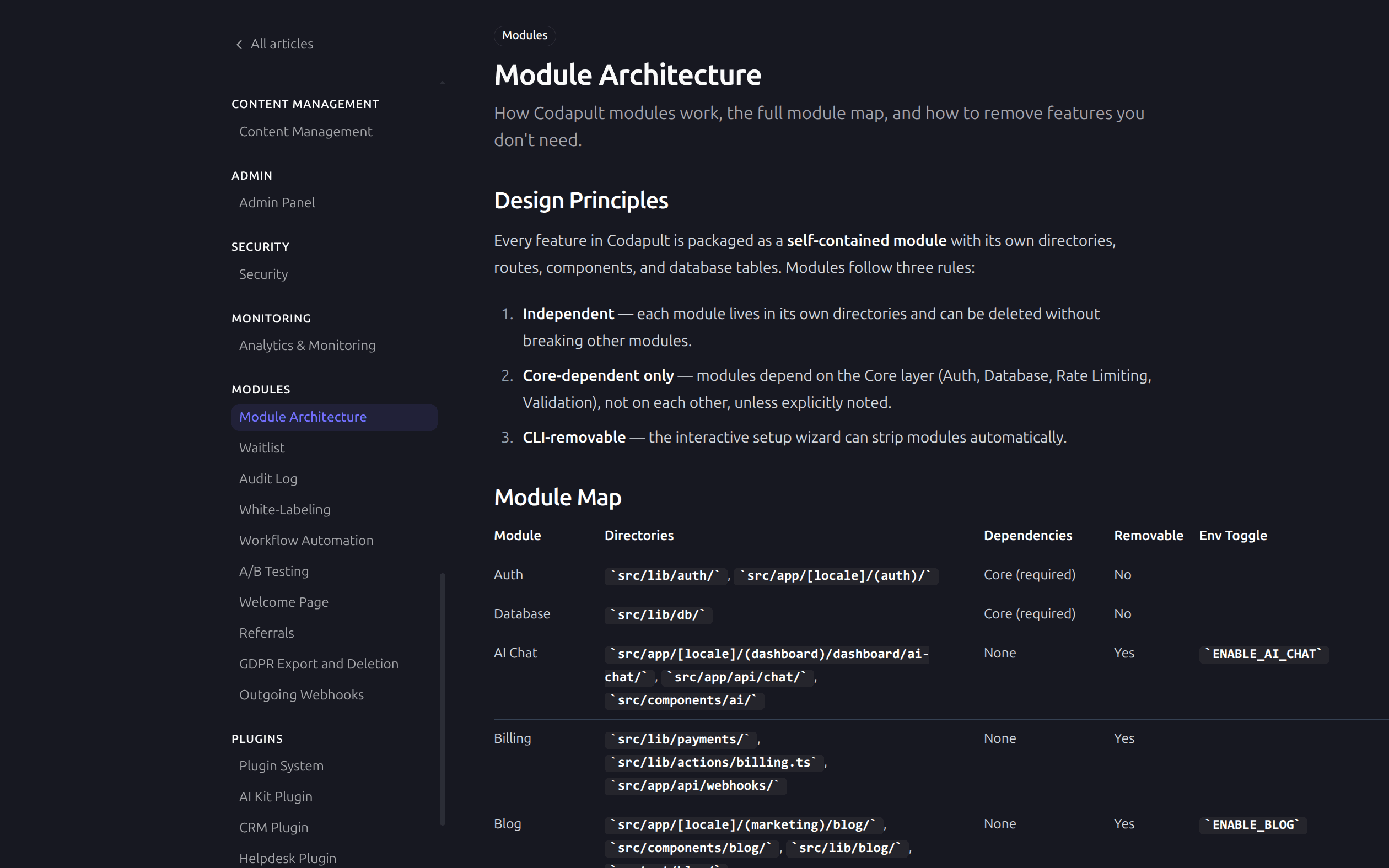
The useful question is: what happens when you remove a module?
If disabling a feature leaves dead navigation links, broken sitemap entries, missing imports, route handlers that still accept requests, or database tables nobody understands, the module was not really modular. It was just grouped in a folder.
Removable modules need boundaries.
Start With User-Facing Surfaces
A module usually shows up in more places than its main page suggests. Take a waitlist feature: there's the public signup route, sure, but also an admin view, an API route, a database table, an email template, a navbar link, a footer link, a sitemap entry. Delete the public page and the feature is still there — just invisible until someone hits the API route directly or wonders why waitlist_entry is sitting in the schema.
Feature Flags Are Not Enough
Feature flags hide behavior at runtime.
They do not remove code.
That distinction matters. Runtime flags are useful for:
- Hiding navigation.
- Returning 404 for disabled routes.
- Removing sitemap entries.
- Preventing API access.
- Running one codebase in multiple modes.
But if a buyer wants a smaller codebase, the setup tool also needs to delete files and update references.
A good starter supports both:
- Feature flags for runtime control.
- Pruning for permanent removal.
Route Groups Help
Next.js App Router route groups are useful for keeping surfaces understandable:
src/app/[locale]/
  (public)/
    (marketing)/
    (auth)/
  (protected)/
    (dashboard)/
    (admin)/
That structure makes it clear which pages are public, protected, authentication-only, or platform admin.
It also lets you reason about SEO. Marketing pages are indexable. Auth, dashboard, and admin pages should be noindex and blocked where appropriate.
Keep Shared Code Honest
The hardest modules to remove are the ones that leak into shared files.
Common leak points:
navigation.ts.sitemap.ts.robots.ts.proxy.ts.- Shared schema files.
- Shared validation schemas.
- Shared server actions.
- Shared dashboard layouts.
If a module needs entries in those files, make the entries obvious and grouped. If a setup wizard removes the module, it should know exactly what to prune.
API Routes Need Gates Too
Disabled UI is not security.
If a module has API routes, those routes need their own gates:
- Auth check.
- Permission check.
- Rate limit.
- Feature flag check.
- Input validation.
The proxy can return 404 for disabled feature routes, but route handlers should still follow the same protected pattern. That keeps modules safe when moved, copied, or extended.
Database Tables Should Be Named by Domain
Module data should be easy to identify.
Good table names:
waitlist_entry.feature_request.audit_log.outgoing_webhook.workflow.
Ambiguous table names make removal riskier. If the table name tells you the module, migration work is easier to review.
Tests Should Prove Removal Boundaries
Useful tests include:
- Disabled feature returns 404.
- Disabled feature is absent from sitemap.
- Disabled feature is absent from navigation.
- API route rejects unauthenticated access.
- Module-specific queries still work when enabled.
You do not need massive coverage for every module. You need enough tests to prevent obvious leaks.
Plugins Are for Bigger Boundaries
Not every removable feature should be a plugin.
A simple waitlist page can be a module.
A CRM with pages, routes, hooks, schema, components, AI helpers, and install commands is a better plugin candidate.
Use plugins when the feature has its own lifecycle and customer value. Use modules when the feature is part of the core application shape.
None of this needs to be exhaustive. It needs to be enough that "modular" describes the codebase instead of describing the marketing copy.
The Payoff
Removable modules give buyers confidence.
They can start broad, then strip what they do not need. Or they can keep a larger operational surface without building it themselves.
The codebase stays understandable because module boundaries are explicit.
Codapult documents removable features in the modules overview, including routes, dependencies, and manual removal notes.