The admin panel lives at /admin (implemented under src/app/[locale]/(protected)/(admin)/) and is restricted to users whose session.user.role is "admin". It provides a central place to manage users, billing, experiments, and operational settings without touching the database directly.
Navigation items for the admin panel are configured in src/config/navigation.ts.
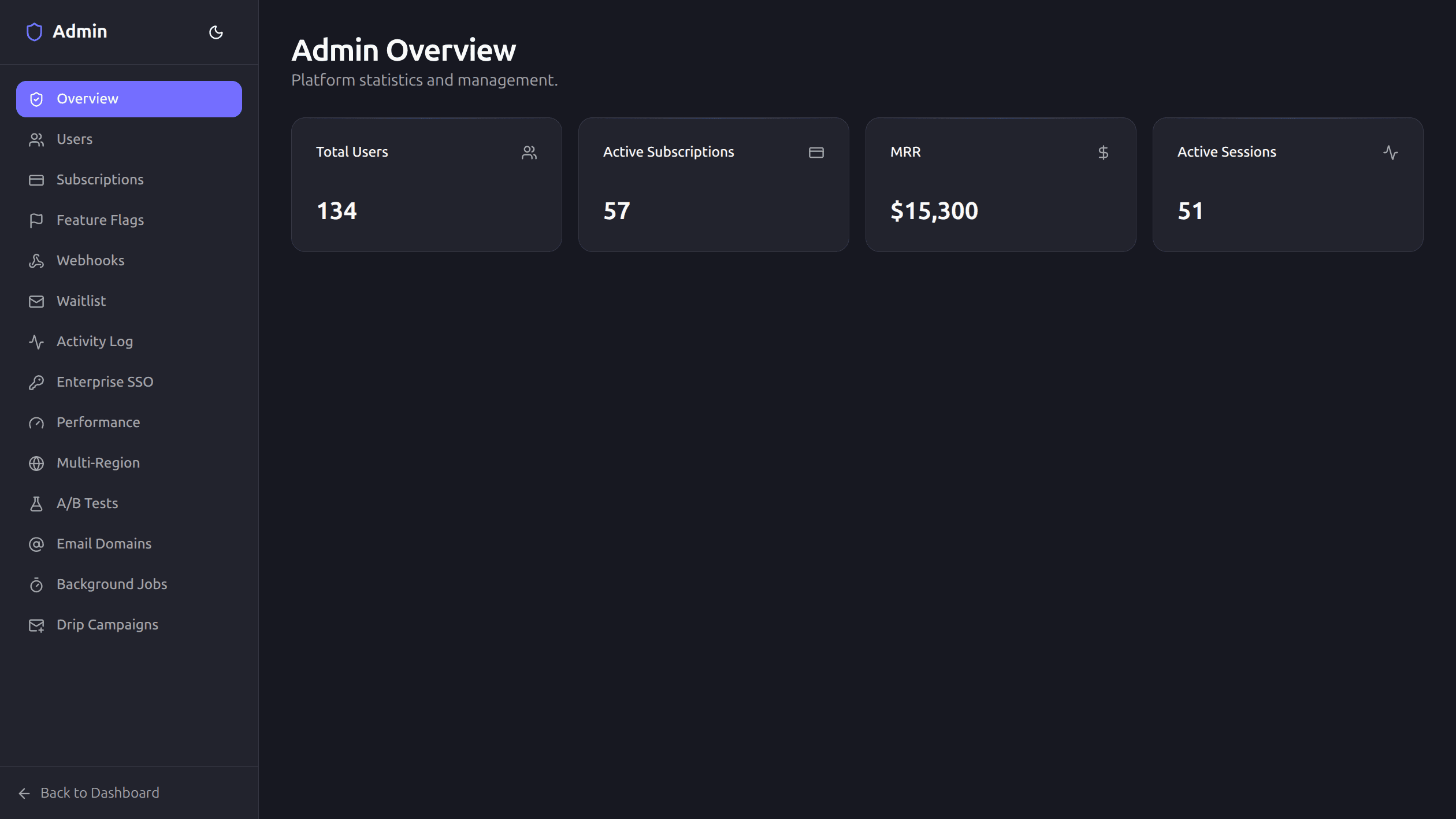
Features
| Feature | Description |
|---|---|
| User management | List all users, change roles, delete accounts |
| Subscription management | View active subscriptions and plan details |
| Feature flags | Toggle features per user, per organization, or globally |
| Webhooks | Outgoing webhook delivery log with retry status |
| Enterprise SSO | SAML connection management (via BoxyHQ Jackson) |
| Performance | Core Web Vitals dashboard (LCP, INP, CLS, FCP, TTFB) |
| A/B Testing | Experiment management with weighted variants and conversion tracking |
| Email domains | Custom sending domain management (via Resend Domains API) |
| Waitlist | Manage waitlist signups and send invitations |
| Activity log | Audit trail of admin actions |
| Drip campaigns | Automated email sequences triggered by user events |
| Background jobs | Registered job handlers, cron schedules, queue stats |
| Multi-region database | Turso group/replica status and regional operations |
Pages and Components
| Route | Component | Purpose |
|---|---|---|
/admin | src/app/[locale]/(protected)/(admin)/admin/page.tsx | Admin overview and KPIs |
/admin/users | UsersTable | User list, roles, deletion, export |
/admin/subscriptions | SubscriptionsTable | Subscription and billing state |
/admin/feature-flags | FeatureFlagsManager | Global, org, and user flag controls |
/admin/webhooks | WebhookDeliveriesTable | Delivery history and retries |
/admin/sso | SSOManager | SAML connection management |
/admin/performance | PerformanceDashboard | Core Web Vitals and performance metrics |
/admin/experiments | ExperimentManager | A/B experiments and variants |
/admin/email-domains | EmailDomainManager | Resend sending domain setup |
/admin/waitlist | WaitlistTable | Waitlist signups and invitations |
/admin/activity | Admin activity page | Internal admin action trail |
/admin/jobs | JobDashboard | Background jobs and cron status |
/admin/multi-region | MultiRegionManager | Turso multi-region controls |
/admin/drip-campaigns | DripCampaignManager | Automated email sequences |
Access Control
Every admin route checks the session before rendering:
import { getAppSession } from '@/lib/auth';
import { redirect } from 'next/navigation';

const session = await getAppSession();
if (!session || session.user.role !== 'admin') {
  redirect('/');
}
Non-admin users who navigate to /admin are redirected away automatically.
Server Actions
Admin mutations are handled by server actions in src/lib/actions/admin.ts. Each action validates the caller's role before proceeding.
changeUserRole
Changes a user's role (e.g. "user" → "admin" or vice versa).
import { changeUserRole } from '@/lib/actions/admin';

await changeUserRole({ userId: 'usr_abc123', role: 'admin' });
deleteUser
Permanently deletes a user account and all associated data.
import { deleteUser } from '@/lib/actions/admin';

await deleteUser({ userId: 'usr_abc123' });
Both actions are protected with requireAuth() and an admin role check. Input is validated with Zod schemas from src/lib/validation.ts.
A/B Testing
The experiment framework in src/lib/experiments/ lets you run A/B tests with:
- Weighted variants — assign traffic percentages to each variant
- Conversion tracking — measure which variant performs better
- Experiment lifecycle — create, start, pause, and conclude experiments
Manage all experiments from the admin panel under the A/B Testing section.
Feature Flags
Feature flags support three scoping levels:
| Scope | Description |
|---|---|
| Global | Affects all users |
| Organization | Affects all members of a specific organization |
| User | Affects a single user |
Toggle flags from the admin UI. Check them in code with the utilities in src/lib/feature-flags.ts:
import { isFeatureEnabled } from '@/lib/feature-flags';

const enabled = await isFeatureEnabled('new-dashboard', { userId, orgId });
Adding Admin Pages
To add a new section to the admin panel:
- Create a page at
src/app/[locale]/(protected)/(admin)/admin/<section>/page.tsx - Add a navigation entry in
src/config/navigation.ts - Check
session.user.role === 'admin'in the page component
Next Steps
- Security — auth guards, rate limiting, and input validation
- Environment Variables — configure SSO, email, and analytics providers
- Customization — branding and white-label settings