Overview
Codapult uses the adapter pattern for payments — switch between Stripe, LemonSqueezy, and Polar by changing a single environment variable. No code changes required.
# .env.local
PAYMENT_PROVIDER="stripe"        # default
# PAYMENT_PROVIDER="lemonsqueezy"  # alternative
# PAYMENT_PROVIDER="polar" # Merchant of Record with GitHub integration| Component | Location |
|---|---|
| Payment adapter | src/lib/payments/ |
| Plan definitions | src/lib/payments/plans.ts |
| Pricing display | src/config/marketing-pricing.ts |
| Server actions | src/lib/actions/billing.ts |
| Stripe webhook | POST /api/webhooks/stripe |
| LS webhook | POST /api/webhooks/lemonsqueezy |
| Polar webhook | POST /api/webhooks/polar |
Subscription Management
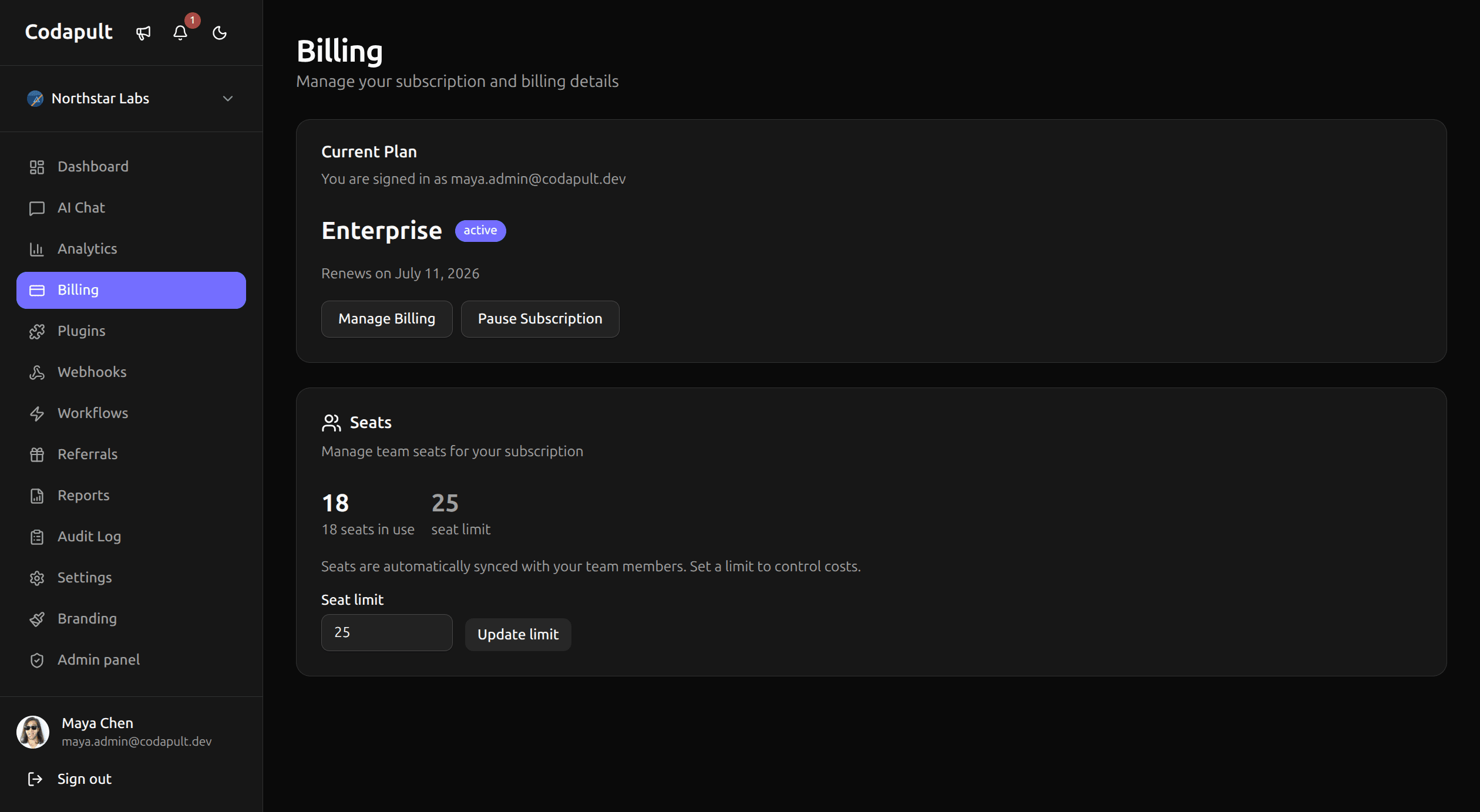
Your end users manage subscriptions from Dashboard → Billing:
- View current plan and usage
- Upgrade or downgrade plans
- Switch between monthly and yearly billing
- Add or remove add-ons
- Cancel subscription
- Access the billing portal (Stripe Customer Portal / LemonSqueezy / Polar)
- Download invoices
Plan Configuration
Plans are defined in src/lib/payments/plans.ts. Each plan specifies a name, price, interval, features, and limits:
export const plans = [
  {
    id: 'free',
    name: 'Free',
    price: { monthly: 0, yearly: 0 },
    features: ['1 project', '100 AI messages/month', 'Community support'],
  },
  {
    id: 'pro',
    name: 'Pro',
    price: { monthly: 19, yearly: 190 },
    features: ['Unlimited projects', '5k AI messages', 'Priority support'],
  },
  {
    id: 'enterprise',
    name: 'Enterprise',
    price: { monthly: 49, yearly: 490 },
    features: ['Everything in Pro', 'Unlimited AI', 'SSO', 'SLA', 'Custom domain'],
  },
] as const;
Update the pricing display for your marketing pages in src/config/marketing-pricing.ts. Client-safe landing-page copy, stats, and module cards stay in src/config/marketing.ts.
Add-Ons
Add-ons are optional extras that extend a subscription. They are combined with the base plan in a single multi-line checkout session:
| Add-On | Description |
|---|---|
| Extra Storage | Additional storage per block |
| Priority Support | Dedicated support channel |
| Custom Domain | Use your own domain |
| White Label | Remove platform branding |
Users select add-ons during checkout or add them later from the billing dashboard.
Seat-Based Pricing
Plans support per-seat pricing. Seats are automatically synced with organization members — when a new member joins, the seat count updates. Admins can set a max seat cap to control costs.
Usage-Based Billing
Plans can include tiered usage pricing for metered features like AI messages or API calls. When users exceed their plan's included quota, overage is billed at the configured rate.
The usage estimator on the pricing page helps your end users predict monthly costs based on expected usage.
Usage Credits
Set a default monthly credit allowance with the DEFAULT_MONTHLY_CREDITS environment variable (accessed as env.defaultMonthlyCredits in server code). Credits reset automatically via a built-in cron job at the start of each billing cycle.
Stripe Connect
Codapult includes Stripe Connect support for marketplace features. Your platform can collect an application fee on transactions processed through connected accounts.
STRIPE_CONNECT_FEE_PERCENT=10 # 10% platform feeThe client-side and the server-side are both read value via env.payments.stripe.connectFeePercent from src/config/env.ts.
Marketing / Guest Checkout
When running in marketing-only mode you can offer checkout without user authentication. There are two approaches — pick one per product or mix them:
Option 1: Direct checkout URL
Set CHECKOUT_URL_* env vars to link CTA buttons directly to an external checkout page (LemonSqueezy store, Gumroad, etc.):
CHECKOUT_URL_STARTER="https://your-store.lemonsqueezy.com/buy/starter"
CHECKOUT_URL_PRO="https://your-store.lemonsqueezy.com/buy/pro"
Option 2: API checkout (provider-agnostic)
Set CHECKOUT_VARIANT_* env vars with provider-specific variant/price IDs. CTA buttons will point to /api/checkout?product=<key>, which creates a checkout session via the active PAYMENT_PROVIDER adapter and redirects the visitor to the provider-hosted payment page:
PAYMENT_PROVIDER="stripe"
CHECKOUT_VARIANT_PLAN1="price_abc123"
CHECKOUT_VARIANT_PLAN2="price_def456"
This approach uses the createGuestCheckout adapter method — Stripe, LemonSqueezy, and Polar are all supported. Switching providers only requires changing PAYMENT_PROVIDER and the variant IDs.
Priority chain
The checkoutHref() helper in src/config/marketing-pricing.ts resolves the CTA link with this priority:
- API checkout (
CHECKOUT_VARIANT_*) →/api/checkout?product=<key> - Direct URL (
CHECKOUT_URL_*) — external hosted checkout link - Fallback —
""
Available product keys: starter, pro, enterprise, plugin-crm, plugin-helpdesk, plugin-email-marketing, plugin-bundle.
Webhooks
Payment providers notify your app of subscription events via webhooks. See the dedicated Payment Webhooks page for event handling, extending handlers, and local testing.
Server Actions
Billing mutations are handled by server actions in src/lib/actions/billing.ts:
createCheckout
Creates a payment checkout session and redirects the user to the provider's payment page.
// Used as a form action
<form action={createCheckout}>
  <input type="hidden" name="planId" value="pro" />
  <input type="hidden" name="interval" value="monthly" />
  <input type="hidden" name="seats" value="5" />
  <button type="submit">Subscribe</button>
</form>
openCustomerPortal
Redirects the user to the provider's billing portal where they can update payment methods, view invoices, and manage their subscription.
<form action={openCustomerPortal}>
  <button type="submit">Manage Billing</button>
</form>
Provider Setup
See the dedicated setup guide for your chosen provider:
- Stripe Setup — API keys, test mode, Stripe Connect, going-live checklist
- LemonSqueezy Setup — API key, store ID, differences from Stripe
- Polar Setup — access token, webhook setup, Merchant of Record with GitHub integration
Module Removal
The payments module is independently removable. See the Modules documentation for step-by-step removal instructions.
Next Steps
- Payment Webhooks — event handling, extending, local testing
- Teams & Organizations — seat-based billing tied to team members
- Database — schema conventions for billing tables